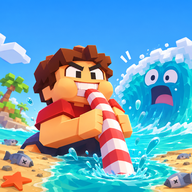

What Is the Drink the Ocean Game?
The Drink the Ocean game is a first-person incremental game with a simple job that gets bigger as you play. You start at the water's edge and drink through a straw. Each sip lowers the surface a little. Keep at it and the floor of the ocean begins to appear: shipwrecks, whale skeletons and sunken cities. The more you drain, the more of that hidden world you can walk.
Salt is the currency that ties the loop together. Drinking alone does not pay you. You carry water in your belly to the PRESS on the beach, stand under it, and the press compresses that water into salt. You then open the SHOP and spend the salt on a larger belly, extra straws, or new tools.
Pinidi Studio released it in November 2026. The Drink the Ocean game is available on Android, iOS and desktop, in 15 languages, and the hosted version plays in landscape in your browser. That is the version you can start in the player above, including any in-game purchases the player itself offers.

How to Play Drink the Ocean
A first session is a short loop you will repeat with better tools. If you want the full control list, open the how to play page. The four steps below are enough to get moving.
Walk to the water and drink
Move to the shoreline and drink through the straw. On a computer, look at the water and press the left mouse button. On a phone, hold the on-screen DRINK button. Keep going until your belly is full; that is the signal to leave the water and head inland.
Stand under the PRESS
Find the press on the beach and stand under it. It compresses the water you are carrying and pays you in salt. Until you do this, the water in your belly is only weight, not money.
Spend salt in the SHOP
Open the shop and spend that salt on upgrades and new tools. Early purchases that increase how much you can hold, or how quickly you can drink, cut down the number of trips you need.
Pull the plug and switch oceans
Keep drinking and pressing until you reach the plug at the bottom of the ocean. Pull it, and you can switch to a new, stronger ocean. The options listed for that next sea are cola, lemonade, slime and lava. The oceans guide covers that changeover.
Drink the Ocean Controls: Keyboard, Mouse and Mobile
Click inside the player first so the page does not take the keys. The same controls are explained step by step on the how to play page.
| Action | Keyboard and mouse | Phone or tablet |
|---|---|---|
| Move | WASD | On-screen stick or pad, once the player has focus |
| Look | Mouse | Drag on the screen |
| Drink | Left mouse button, at the water | Hold the on-screen DRINK button |
| Jump | Space | On-screen jump control |
| Switch tools | 1, 2 and 3 | The tool control shown in the player |
| Go home | T | The home control in the player |
| Sky Duck gifts | E | The gift control in the player |
| Settings | P | The settings control in the player |
| Free the mouse | Tab | Not needed on a touch screen |
Drink the Ocean Upgrades, Boosts and New Oceans
Four upgrades are named in the game's own description, and each one changes the same loop in a different way.
Bigger belly
You can hold more water before you have to walk back to the press, so each trip is worth more salt.
Extra straws
Your drinking capacity goes up, which shortens the time you spend at the waterline filling up.
Mouth vacuum
A new tool for pulling in water, unlocked through the shop. Switch tools with the 1, 2 and 3 keys on a keyboard.
Pocket whirlpool
Another shop tool. Once you have more than a straw, learning when to switch is as useful as the upgrade itself.
The Sky Duck gives boosts during a run, and an achievements system follows your progress. When a sea is empty you are not finished: you pull the plug and pick a new ocean to drink. The upgrades guide walks through this path in more detail, and the tips page covers habits that make the first hour smoother.

Drink the Ocean Tips for Your First Session
- Treat the PRESS as part of every circuit. Salt arrives when you stand under it, not when you take a sip.
- Spend early salt on capacity so you are not jogging back and forth with a tiny belly.
- If you lose your bearings, the T key takes you home.
- Open the Sky Duck's gifts with E when you have them, and use P for settings if you need to adjust the session.
- On a phone, turn the screen sideways or use fullscreen. The game is built for landscape.
- Click inside the player before you use the keyboard, so the page does not steal the keys.
Drink the Ocean Game FAQ
What is the Drink the Ocean Game?
It is a first-person incremental game in which you stand on a blocky shore and drink the sea through a straw. As the water level falls, more of the seabed comes into view. Salt is the currency: you drink, stand under the press to compress the water into salt, and spend that salt in the shop on upgrades.
Who developed it?
Drink the Ocean is developed by Pinidi Studio. The studio published the game in November 2026. A playable version is hosted on Playgama, and that is the version embedded on this site.
Can I play Drink the Ocean unblocked?
Yes. You can play Drink the Ocean unblocked in the browser on this page, with no download and no account on this site. The player above loads the hosted game directly.
Is the game free, and are there purchases?
You can play for free in the browser. The game also offers in-game purchases inside the hosted player. Those purchases are handled by the host and the developer; this site does not process payments or issue refunds.
How do you turn water into salt?
Walk to the water, drink until your belly is full, then stand under the PRESS on the beach. The press compresses the water you are carrying into salt. That salt is what you spend in the SHOP.
Which upgrades can you buy?
The shop lists a bigger belly, which lets you carry more water between trips to the press; extra straws, which increase how much you can drink; a mouth vacuum, a tool for pulling in water; and a pocket whirlpool, another tool unlocked through the shop. See the upgrades guide for a longer walkthrough.
What is hiding under the water?
As the water drops you can uncover shipwrecks, whale skeletons and sunken cities. The further you drain, the more of that hidden shoreline comes into reach.
What happens when the ocean is empty?
Once you have drained the water down to the plug at the bottom, you can pull the plug and switch to a new, stronger ocean. The listed options are cola, lemonade, slime and lava. The oceans page walks through that step.
What does the Sky Duck do?
A character called the Sky Duck gives boosts during a run. You can open those gifts with the E key on a keyboard. An achievements system also tracks your progress. The exact boost list is shown in the game itself.
Does it work on a phone?
Yes. It is available on Android, iOS and desktop, and it is built for landscape. On a phone, turn the screen sideways or use the fullscreen control; hold the on-screen DRINK button instead of clicking. A keyboard and mouse on a computer still give the most precise movement.
How many languages does it support?
The hosted version is available in 15 languages. The language list lives in the game and on the Playgama listing; this site's guides are written in English.
Is this the same as Roblox Drink The Ocean For Brainrots?
No. Drink the Ocean by Pinidi Studio is a first-person browser game about sipping a sea through a straw, pressing salt and draining the water. Roblox Drink The Ocean For Brainrots is a different project and is not the game described on these pages.
Where is progress saved?
Saving is handled by the hosted player and your browser, not by an account on this site. If you clear site data, or switch devices, a run may not come with you. Use any save control the game itself offers before you leave.
How can I get in touch?
Write to support@drinktheoceangame.com. The contact page lists what to include. Questions about the game software itself are best directed through the Playgama listing, since Pinidi Studio developed the game.
Still stuck on a control or an upgrade? The full FAQ lives on its own page, and you can write to us from contact.
More Drink the Ocean Guides
- How to play Drink the Ocean: the full loop and every keyboard and phone control.
- Drink the Ocean upgrades: the shop, salt, the Sky Duck and achievements.
- Drink the Ocean oceans: pulling the plug and the cola, lemonade, slime and lava seas.
- Drink the Ocean tips: habits that make the first long session smoother.
- Drink the Ocean FAQ: unblocked play, purchases, languages and the Roblox name clash.